LoRa modulation comparison
LoRa packets come in a wide variety of shapes and sizes, depending on their parameters. These shapes bring with them pros and cons. One of the biggest impacts is the airtime. Meshes have to choose between range, noise tolerance, and time on the air, finding the right balance of link reliability and congestion for their density and location.
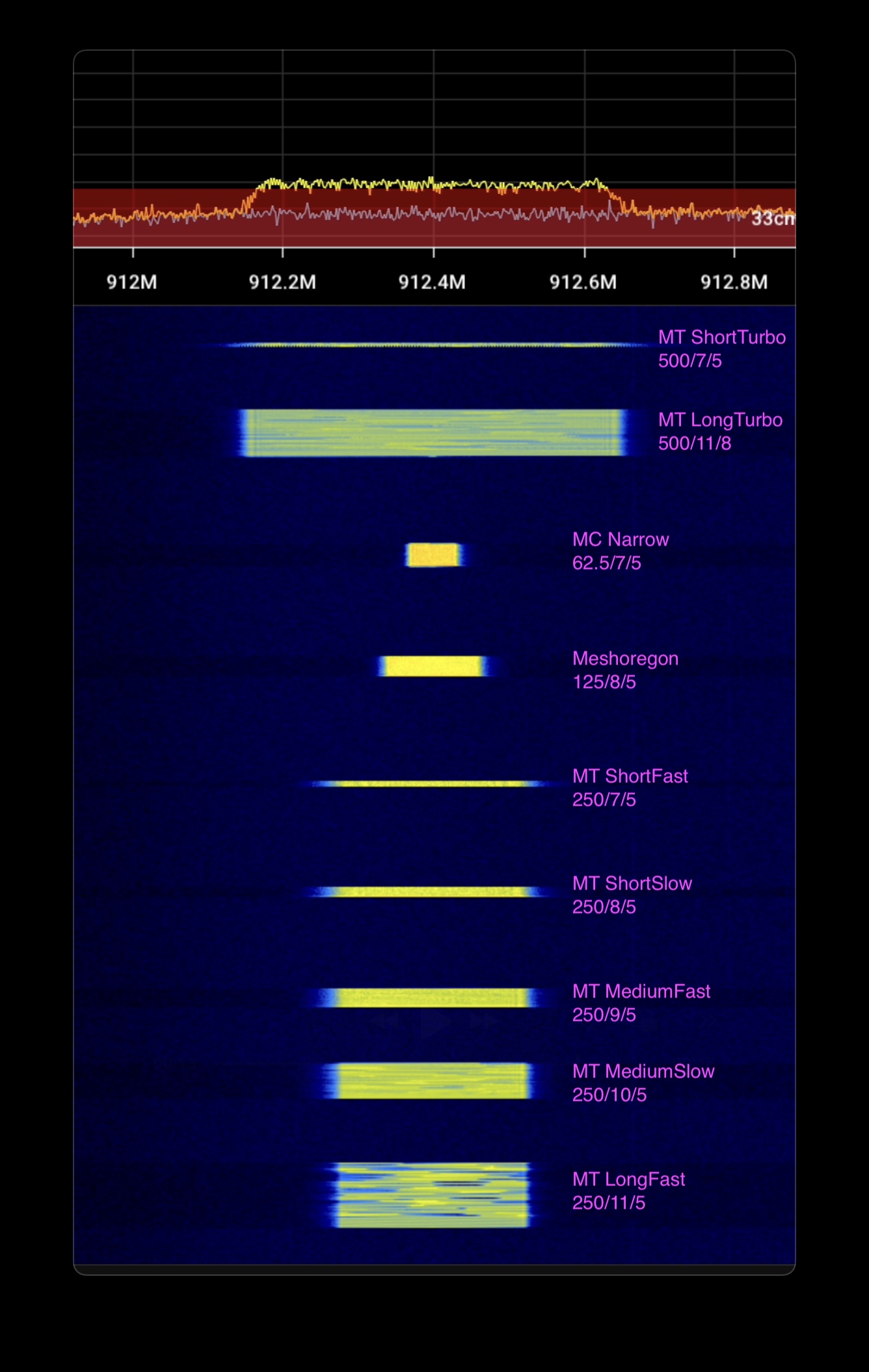
At the default settings, a Meshtastic packet can take literally a whole second to transmit. This gives it great range and resilience, but a mesh can quickly become congested as soon as it exceeds the number of contacts a typical device can hold. Faster settings sacrifice range for much lower airtime, and can use infrastructure to compensate for lower link reliability with retries of packets. Each step faster in Meshtastic presets is a roughly 45% reduction in airtime.
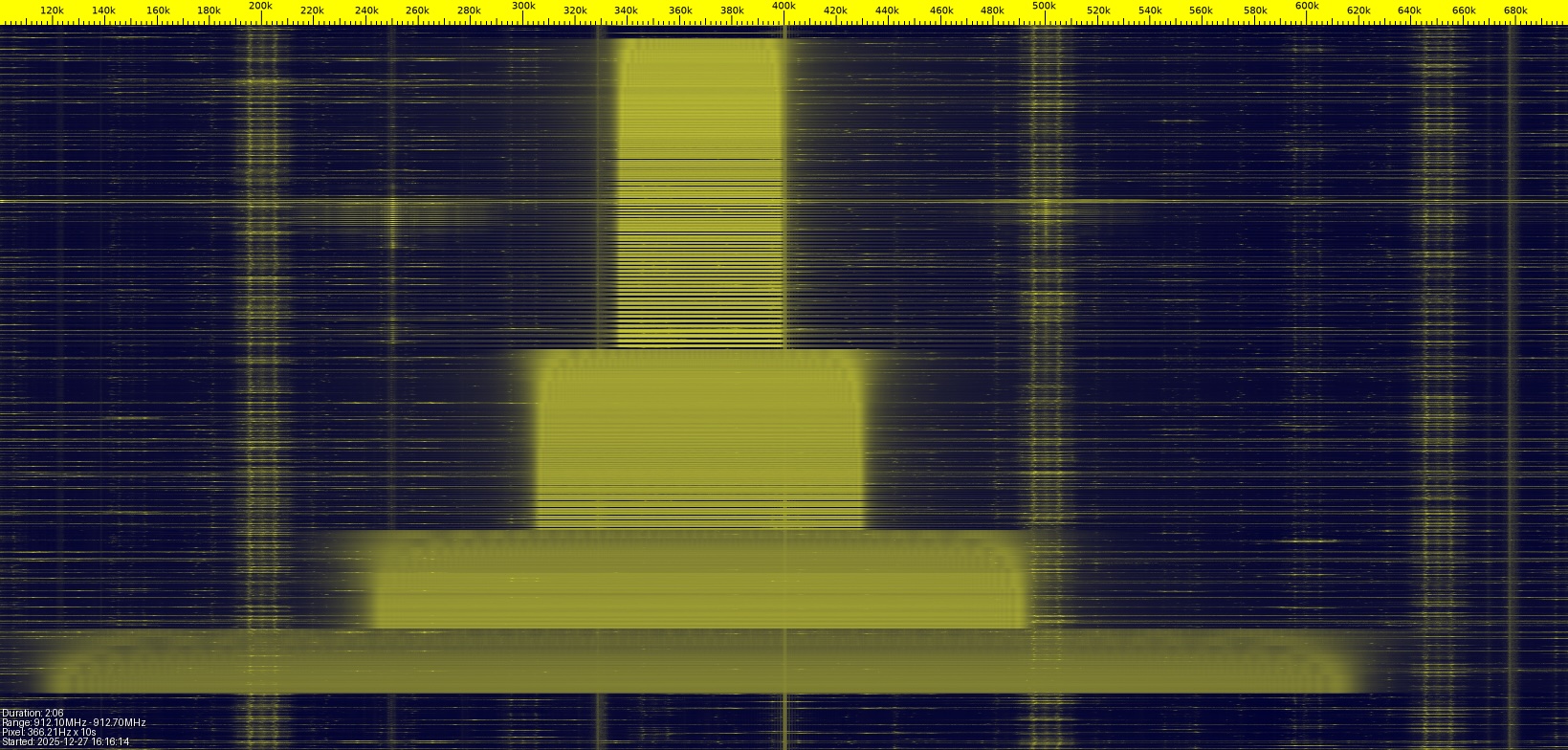
The bandwidth also changes the exposure to noise. Wider bandwidth gives LoRa a much quicker transmission speed and reduces risk of "vertical" collisions in the temporal dimension, but it increases the chance of "horizontal" collisions in the spectral dimension—in addition to increased thermal noise exposure. There is a sort of physicality to how the each packet fits into the limited time and spectrum available.
These are the presets and their calculated attributes based on the Semtech LoRa calculator:
| preset | bandwidth | spread_factor | coding_rate | effective_data_rate_bps | time_on_air_ms | link_budget_dB | range_km | processing_gain_dB |
|---|---|---|---|---|---|---|---|---|
| MC Narrow–Long | 62.5 | 9 | 5 | 879 | 248 | 154.0 | 4.89 | 27 |
| LongMod | 250 | 11 | 8 | 671 | 297 | 153.0 | 4.58 | 33 |
| LongFast | 250 | 11 | 5 | 1074 | 248 | 153.0 | 4.58 | 33 |
| MediumSlow | 250 | 10 | 5 | 1953 | 124 | 150.5 | 3.89 | 30 |
| MC Narrow | 62.5 | 7 | 5 | 2734 | 72 | 149.0 | 3.53 | 21 |
| Meshoregon | 125 | 8 | 5 | 3125 | 72 | 148.5 | 3.41 | 24 |
| MediumFast | 250 | 9 | 5 | 3516 | 62 | 148.0 | 3.30 | 27 |
| LongTurbo | 500 | 11 | 8 | 1343 | 148 | 148.0 | 3.30 | 33 |
| ShortSlow | 250 | 8 | 5 | 6250 | 36 | 145.5 | 2.80 | 24 |
| ShortFast | 250 | 7 | 5 | 10938 | 18 | 143.0 | 2.38 | 21 |
| ShortTurbo | 500 | 7 | 5 | 21875 | 9 | 138.0 | 1.72 | 21 |
Demonstration
These steps will reproduce the above demonstration. This uses MeshCore because it can change radio settings without a device reboot, but the output is equivalent to any LoRa transmission.
Tune an SDR to the desired frequency. The script defaults to 912.4 MHz.
Flash a node as a USB MeshCore companion.
Install the meshcore python library:
pip install meshcore.Run the script (set the
INTERFACEto the connected device):import asyncio from meshcore import MeshCore, EventType INTERFACE = "/dev/tty.usbmodem1301" # Set this to your local device FREQUENCY = 912.4 # MHz, Change this to the desired frequency PRESETS = [ (250,11,5), # MT LongFast (250,10,5), # MT MediumSlow (250,9,5), # MT MediumFast (250,8,5), # MT ShortSlow (250,7,5), # MT ShortFast (125,8,5), # MeshOregon (62,7,5), # MC Narrow (62,9,5), # MC Narrow Long (500,11,8), # MT LongTurbo (500,7,5), # MT ShortTurbo ] async def main(): meshcore = await MeshCore.create_serial(INTERFACE) await meshcore.commands.set_tx_power(1) # Be a good RF neighbor await asyncio.sleep(1) for (bw,sf,cr) in PRESETS: await meshcore.commands.set_radio(FREQUENCY, bw, sf, cr) print((bw, sf, cr)) result = await meshcore.commands.send_chan_msg(0, "The quick brown fox jumped over the lazy dog") print(result) await asyncio.sleep(1) await meshcore.disconnect() asyncio.run(main())